
Five lessons from shipping a GenAI app with Databricks Asset Bundles - and the health check that lied to us.
The deployment was green. The /health endpoint returned {"status": "ok"}. The reports page loaded fine. And yet the main page of the app showed exactly this:
{"detail": "Not Found"}
No stack trace in the browser, nothing red on the platform side. The cause turned out to be one missing secret. The whole chat UI depended on it, and the failure to mount the UI was caught and logged, so the rest of the app kept running.
Over the last few months my team at DS Stream built a GenAI assistant on Databricks for an enterprise client. It's a LangGraph agent with a Chainlit chat frontend, running on FastAPI as a Databricks App. It helps data owners research tables in Unity Catalog, draft documentation, and publish it to the company's data catalog after a human approves it. A daily Databricks workflow feeds it with metadata and Vector Search indexes.
The agent logic was the interesting part. The deployment was the part that kept surprising us. In an earlier article I wrote about CI/CD for Databricks workflows with Asset Bundles (Databricks has since renamed them to Declarative Automation Bundles; the CLI and YAML are the same). Apps look similar on paper - one more resource in databricks.yml - but they behave differently enough to deserve their own list of traps.
Here are five of them.
A quick mental model first
A job in a bundle is mostly a definition. You deploy it, and the next run picks up the new code. An app is different: it's a long-running process with its own compute, its own service principal, and a concept of deployments (versions of the source code that are actually running).
That gives you three separate things to keep in sync:
- The app resource - name, permissions, budget policy, attached resources (warehouse, secrets).
- The source code in the workspace.
- The active deployment - the snapshot of code and configuration the running process actually uses.
Several of the traps below come from assuming that updating #1 and #2 also updates #3.
Lesson 1: bundle deploy is not a rollout
Picture this: you change a prompt, run databricks bundle deploy, and open the app. The old prompt is still there, even though the files in the workspace are already new.
The reason is simple once you know it. bundle deploy syncs files and creates or updates the app resource. It doesn't create a new app deployment. The Databricks docs say it plainly: "Deploying a bundle doesn't automatically deploy the app to compute." The running app keeps serving the last snapshot.
The docs suggest two ways to finish the job: the UI, or databricks apps deploy. Their bundle tutorial then uses bundle run <app_key> as the step that starts the app. We chose bundle run; it's our convention, not an official requirement. Either way, a rollout is two commands, not one:
databricks bundle deploy -t dev # sync files, update the app resource
databricks bundle run my_agent_app -t dev # create a new deployment and start it
bundle run <app_key> is the step that actually rolls the app out. And it takes the app configuration from the bundle, for the target you selected. That detail becomes important in lesson 2.
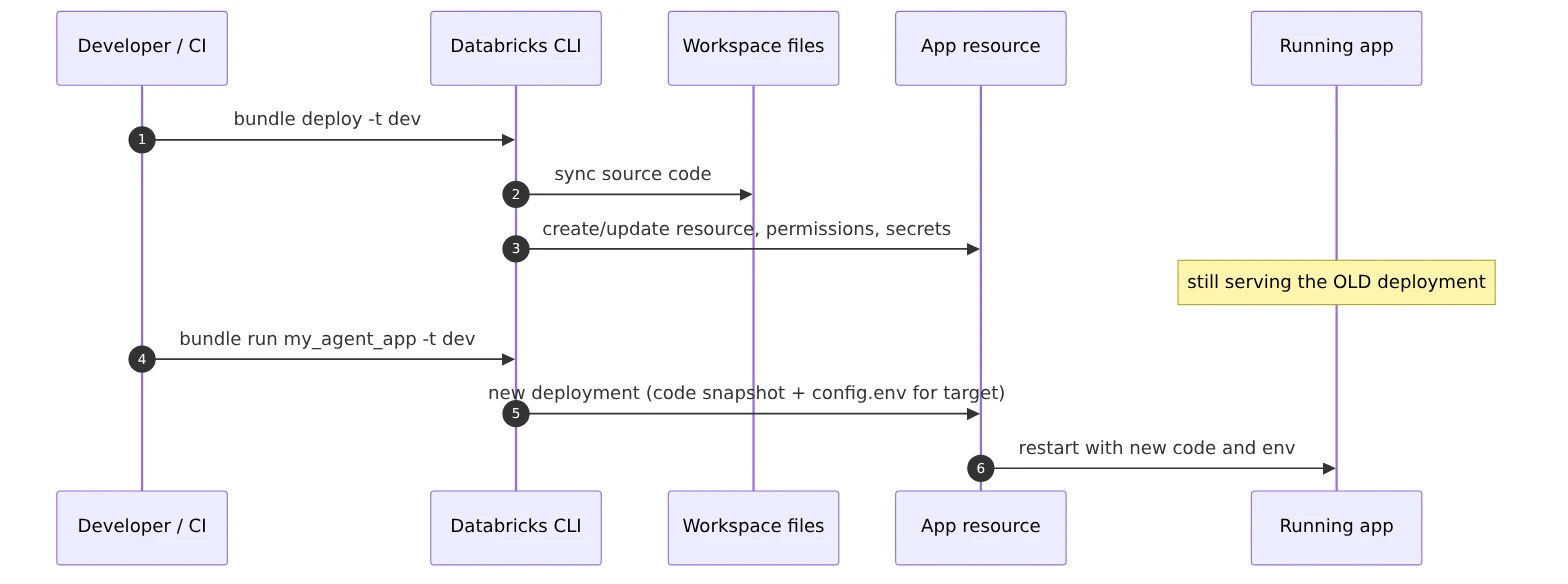
In CI this is just two steps in the same job. The only rule: never treat a green bundle deploy as "the new version is live".
Lesson 2: decide which file is the source of truth for configuration
A Databricks App can get its runtime configuration from two places:
app.yamlin the source folder - the classic manifest withcommandandenv.configon the app resource indatabricks.yml- the samecommandandenv, but inside the bundle, with access to target variables.
When both are set, the docs say the bundle config.env overrides the variables from app.yaml. The snippet below is simplified from our real bundle.
We started with app.yaml, like most tutorials do. It worked until we had three environments. Each needed a different catalog, schema, warehouse, model endpoint, and service principal. A single static file can't express that, so we moved everything to databricks.yml:
resources:
apps:
my_agent_app:
name: ${var.app_name}
budget_policy_id: ${var.budget_policy_id}
source_code_path: ${workspace.file_path}/app
config:
command: ["sh", "-c", "uv sync --frozen && exec uv run uvicorn src.app:app --port $DATABRICKS_APP_PORT"]
env:
- name: CATALOG
value: ${var.catalog}
- name: APP_ENV
value: ${bundle.target}
- name: APP_GIT_COMMIT
value: ${bundle.git.commit}
- name: CHAINLIT_AUTH_SECRET
value_from: chainlit-auth-secret # name of the resource below
resources:
- name: chainlit-auth-secret
secret:
scope: my-secret-scope
key: chainlit-auth-secret
permission: READ
Three things are worth noticing here.
Secrets are resources, not values. You declare the secret (scope + key) under resources: of the app, and reference it by name with value_from. The decrypted value is injected at runtime; neither file ever contains it. One catch: in a bundle-managed app, the secret resource is declared in databricks.yml (app resources can also be added in the UI or API). app.yaml can reference a resource by name with valueFrom, but can't declare it. Note the spelling: valueFrom in app.yaml, value_from in the bundle.
Free metadata. ${bundle.target} and ${bundle.git.commit} cost nothing and save a lot of time later. We stamp them on every MLflow trace, so when someone reports a bad answer, we know which commit produced it.
Resource references beat hardcoded names. In mode: development the CLI prefixes some resource names with [dev your.name]. If the app hardcodes the MLflow experiment name, it looks for a different experiment than the one the bundle created and granted it access to. We pass ${resources.experiments.agent_traces.name} instead, and the app always uses the right one.
So what's left in app.yaml? We kept it, but on purpose. It holds fail-closed defaults for local or manual runs. For example, publishing to the external catalog is disabled there, and only the bundle turns it on per environment. If someone deploys the "wrong" way, the app is limited, not dangerous.
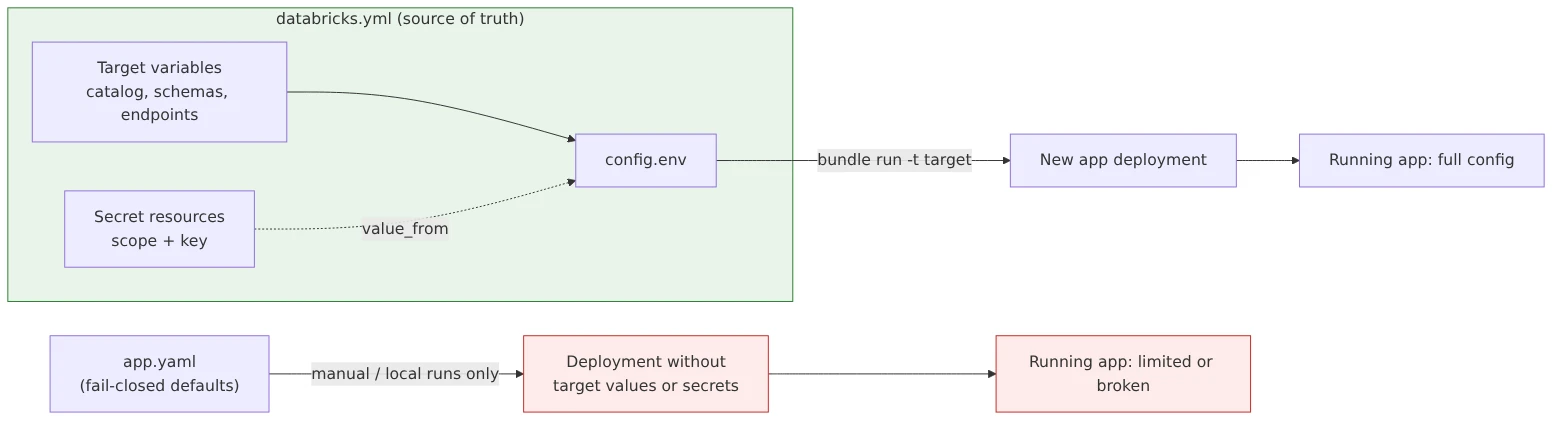
This is also why we stopped using a named databricks apps deploy <app-name> against the workspace folder. In our setup, that path read the environment only from app.yaml. It didn't select a bundle target, so secret-backed variables were simply missing. The CLI keeps changing here (recent versions add a project-directory mode of apps deploy), so check what your version does. The docs do list apps deploy as a valid option; avoiding it is our own rule: one way to deploy, and it goes through the bundle.
Lesson 3: your health check can lie
Back to the 404 from the intro.
Our FastAPI app mounts the Chainlit UI at / and also serves /health and /reports. Chainlit's header authentication needs CHAINLIT_AUTH_SECRET. When the variable is missing, mounting Chainlit throws an exception. Our code caught it, logged it, and carried on, so one broken module wouldn't take down the whole service. (The app config now also requires this secret at startup, so a missing value fails fast.)
try:
mount_chainlit(app=app, target="src/frontend/chainlit_app.py", path="/")
except Exception as e:
logger.error("Failed to mount Chainlit: %s", e, exc_info=True)
From the platform's point of view, everything was fine. The process was up and /health answered ok. But the only thing users actually cared about was gone.
The lesson isn't "never catch exceptions". It's that a liveness probe is not a smoke test. /health tells you the process is running. It doesn't tell you the product works.
So we wrote a small smoke test script. The right place for it is the deployment pipeline, as the step right after bundle run. It runs as a real user with a CLI token and checks that:
/health,/and/reportsreturn 200 and the expected content;- the chat opens a session and the agent answers a simple question;
- a real table lookup works end to end (SQL warehouse, Vector Search, LLM);
- the app logs have no
ERRORor traceback since the test started.
It's not a full test suite, and it doesn't try to be. It answers one question: can a user open the app and get a useful answer right now?
Lesson 4: identity and permissions have more layers than you think
A Databricks App comes with its own service principal, created by the platform. That's convenient: no personal access tokens, and OAuth is refreshed for you. But it also means there are now at least three identities in play:
| Identity | What it needs |
|---|---|
| The person or CI principal deploying the bundle | Permission to create the app and to use its budget policy |
| The app's own service principal | CAN_USE on the warehouse, read on secrets, CAN_EDIT on the MLflow experiment, grants on Unity Catalog tables |
| The end user | CAN_USE on the app |
Two errors taught us this the hard way.
403 Unable to use fallback policies. Apps and serverless workloads can be assigned a budget policy (budget_policy_id on the app resource). In our case, the deploying identity had no entitlement to the fallback policy the platform tried to use, so deploys failed with a 403 that had nothing to do with the code change. Now every target pins the policy explicitly.
CI losing access to its own app. A manual deployment from a laptop replaces the app's ACL with whatever permissions that deployment declares. If the CI service principal isn't on the list, the next CI run fails with 403. The fix was to always list the CI principal with CAN_MANAGE in the bundle's permissions block, with a comment explaining why.
Bundles also make the app's service principal easy to reference, so you can grant it access without copying IDs around:
experiments:
agent_traces:
name: /Shared/my-agent-traces
permissions:
- service_principal_name: ${resources.apps.my_agent_app.service_principal_client_id}
level: CAN_EDIT
Lesson 5: app startup is part of your deployment
Our start command is uv sync --frozen && exec uv run uvicorn .... --frozen means the app installs exactly what's in uv.lock, which is what you want in production.
The catch: one of our dependencies is an internal package in a private package repository. uv sync needs credentials for it at app startup, not at build time. Without them, the deployment "succeeds", the process starts, uv sync fails, and the app never comes up.
We solved it the same way as every other secret: credentials stored in a secret scope, declared as app resources, injected with value_from as UV_INDEX_<NAME>_USERNAME and UV_INDEX_<NAME>_PASSWORD. These are the variables uv reads for a named index. No credentials in the repository, no custom wheel uploads.
Two smaller startup things worth checking early:
- Cold start time. Because
uv syncruns at startup, every dependency is installed again on each new deployment. An LLM stack (LangChain, LangGraph, MLflow) is not small, so keep the dependency list lean. - Embedding. We embed the app in an iframe on another domain. By default, Chainlit's session cookie is
SameSite=Lax, so the browser drops it on cross-site requests and the UI loops on401. SettingCHAINLIT_COOKIE_SAMESITE=nonefixed it, together with an explicit list of allowed frame origins.
Putting it together
When the app "doesn't work" after a deployment, this is the order we check things in now:
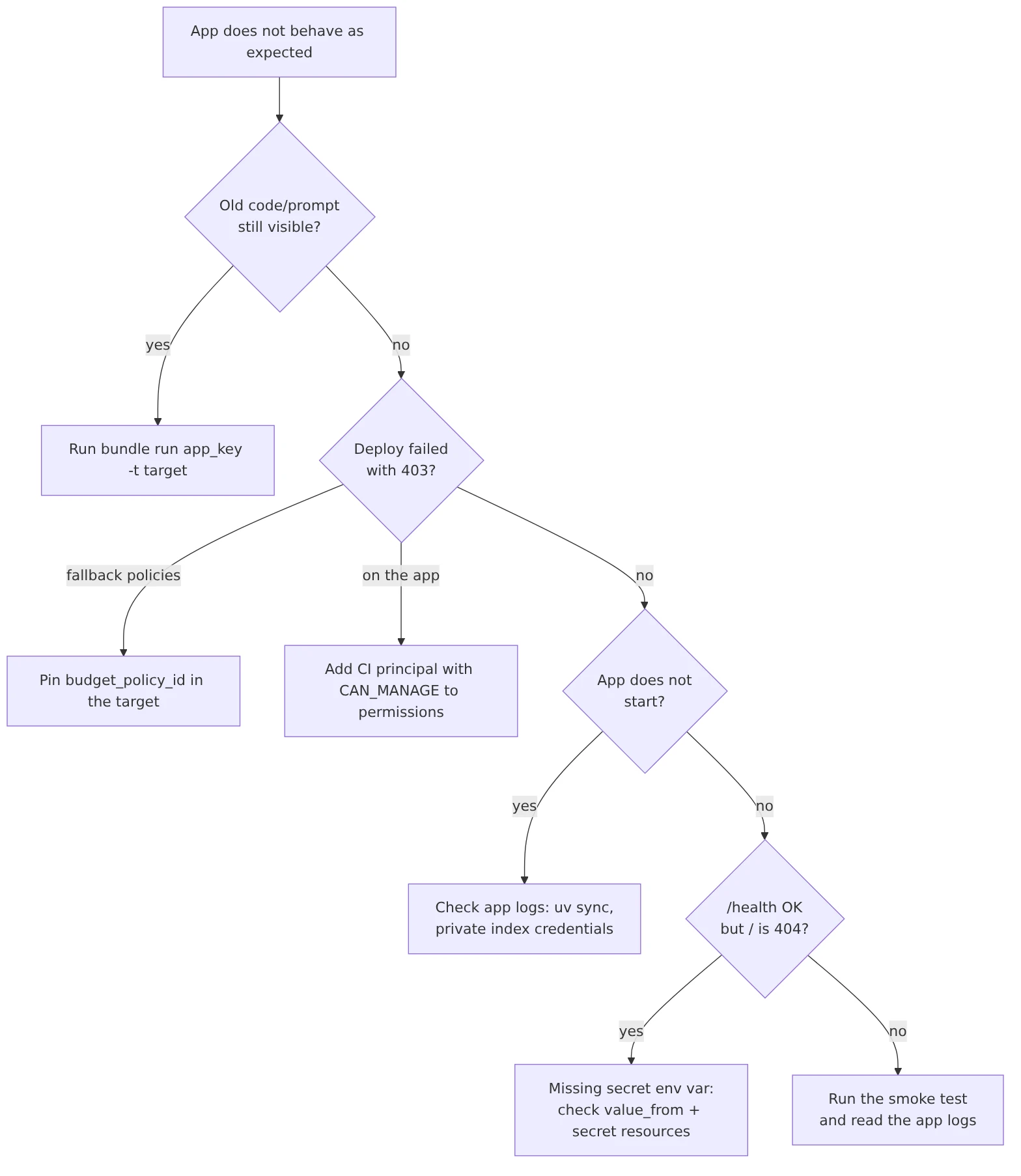
And the short version as a table:
| Symptom | Likely cause | Fix |
|---|---|---|
| Old code still running after a green deploy | Only bundle deploy was run | Add bundle run <app_key> -t <target> |
| Secret-backed env vars are empty | Deployed outside the bundle, or app.yaml used as source of truth | Deploy through the bundle; declare secret resources there (value_from) |
| 403 Unable to use fallback policies | No budget policy pinned for the target | Set budget_policy_id on the app |
| CI gets 403 on the app | A manual deployment replaced the app's ACL | Keep the CI principal in the bundle permissions |
| /health OK, / returns {"detail":"Not Found"} | UI failed to mount (e.g. missing auth secret) | Fix the secret; add a smoke test that checks / |
| App never becomes available | Dependency install fails at startup | Inject package index credentials as secrets |
| Endless 401 inside an iframe | Session cookie blocked cross-site | SameSite=None cookie and allowed frame origins |
Final thoughts
Databricks Apps remove a lot of work: no Kubernetes, no ingress, no OAuth plumbing, and the app sits right next to your data and governance. For an internal GenAI tool, that's a very good deal.
But "managed" doesn't mean "nothing to think about". None of the problems above was a bug in the agent. Each one was a gap between what we thought a command did and what it actually did. If I had to keep only three rules, they would be:
- Deploy, then run. Every time, in every environment.
databricks.ymlis the source of truth;app.yamlis a safe fallback.- Test the product, not the process. A green
/healthis where checking starts, not where it ends.
If you are moving a GenAI assistant or an internal tool onto Databricks Apps and want the bundle, permissions and smoke tests set up right the first time, this is the kind of Databricks platform work we do every week. Talk to our team about what it would take in your environment.
Sources

